Automating Mobile Versioning (React-Native) with GitHub Actions

Keeping Android and iOS version numbers in sync and up to date is a small but crucial part of mobile app development. Whether you’re preparing for a production release or testing on internal distribution channels, incrementing your app’s version code (Android) or build number (iOS) is a step you can’t skip.

Manually updating these numbers is error-prone and tedious, especially when working in a team or releasing frequently. Fortunately, with GitHub Actions, we can automate this entire process directly from our CI pipeline.

In this post, I’ll walk you through how to automatically bump version numbers for Android and iOS projects using GitHub CI, ensuring consistent versioning, fewer manual mistakes, and a smoother release workflow.

In a React Native project, we use Changesets that handles semantic versioning based on commit-level changes, serving as the source of truth for internal version bumps and release automation.

When a release is ready and merged into main, our GitHub CI pipeline automatically handles native versioning for both Android and iOS.

  • Merging develop into main triggers Changesets to publish a new release, bumping the package.json version according to semantic versioning rules.
  • A GitHub Actions workflow, configured to run on every push to main, picks up this version bump.
  • For Android, the workflow reads the existing versionCode from build.gradle and increments it by 1.
  • For iOS, it reads the new version directly from package.json and sets it as the CFBundleShortVersionString in Info.plist.
  • Finally, the updated Android and iOS version files are committed and pushed back to the main branch.
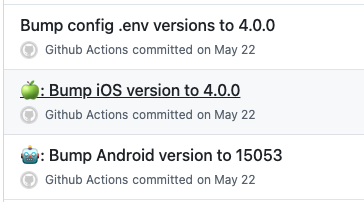
The commits made by GitHub CI
name: Release

on:
  push:
    branches:
      - main

concurrency: ${{ github.workflow }}-${{ github.ref }}

env:
  ANDROID_PATH: android/app/build.gradle
  ANDROID_VERSION_CODE: 0
  VERSION_NAME: ''

jobs:
  release:
    name: Release
    timeout-minutes: 15
    runs-on: macos-latest

    steps:
      - name: Checkout Repository
        uses: actions/checkout@v4

      - name: Setup Node
        uses: actions/setup-node@v4
        with:
          node-version: 22

      - name: Install Dependencies
        run: yarn

      - name: Install Bash 4 and GNU sed on Mac
        run: |
          brew install gnu-sed

          echo "/usr/local/bin" >> $GITHUB_PATH
          echo "$(brew --prefix)/opt/gnu-sed/libexec/gnubin" >> $GITHUB_PATH

      - name: Extract existing version code for Android
        run: |
          # Extract version number from package.json
          version_name=$(grep "version" package.json | sed 's/^.*"version": "//g' | sed 's/",$//g')

          # Get existing version code from build.gradle
          android_version_code=$(grep "versionCode" ${{ env.ANDROID_PATH }} | awk '{print $2}' | tr -d '\n')

          # Increment existing version code by 1
          android_version_code=$((android_version_code + 1))

          # Set environment variable for later use
          echo "VERSION_NAME=$version_name" >> $GITHUB_ENV
          echo "ANDROID_VERSION_CODE=$android_version_code" >> $GITHUB_ENV

      - name: Increase version code and change version name for Android
        run: |
          # Update build.gradle with new version code and name
          echo "${{ env.ANDROID_VERSION_CODE }}"
          sed -i "s/versionCode [0-9]\+/versionCode ${{ env.ANDROID_VERSION_CODE }}/g" ${{ env.ANDROID_PATH }}
          sed -i "s/versionName \"[^\"]*\"/versionName \"${{ env.VERSION_NAME }}\"/g" ${{ env.ANDROID_PATH }}

      - name: Commit and push changes
        run: |
          git config user.email "github-actions@github.com"
          git config user.name "Github Actions"
          git commit -am "🤖: Bump Android version to ${{ env.ANDROID_VERSION_CODE }}"
          git push origin HEAD

      - uses: yanamura/ios-bump-version@v1
        with:
          version: ${{ env.VERSION_NAME }}
          project-path: ios

      - name: Commit and push changes
        run: |
          git config user.email "github-actions@github.com"
          git config user.name "Github Actions"
          git commit -am "🍏: Bump iOS version to ${{ env.VERSION_NAME }}"
          git push origin HEAD

      - name: Bump versions for each config environment file
        run: |
          find config -type f -name '*.env' | xargs gsed -i -e 's/APP_VERSION=\"[^\"]*\"/APP_VERSION=\"${{ env.VERSION_NAME }}\"/g'
          git config user.email "github-actions@github.com"
          git config user.name "Github Actions"
          git commit -am "Bump config .env versions to ${{ env.VERSION_NAME }}"
          git push origin HEAD
TypeScript: The satisfies operator

The satisfies keyword was Introduced in TypeScript 4.9 and is an operator that checks if a value meets a specific type. It’s useful for checking that a values follows a certain type, and keeps the exact value’s type information.

Imagine in some weird universe we have two ways of authenticating a user, and we want to represent the result of that authentication in TypeScript. This type is either a bearer token from an Authorization header, or it’s an object with a username and password.

You can create a union type like this:

type AuthorizationHeader = string;
type AuthorizationObject = { username: string, password: string};

type Authorization = AuthorizationHeader | AuthorizationObject;

Normally, you might use as or : type to tell TypeScript, “Hey, trust me—this fits the type!” But those can sometimes lose details about the value.

const token = 'Bearer eyJhbGciI***fQ' as Authorization

The TypeScript compiler does not know that token matches the string type. When using the as operator, we’re losing the primitive type. In the above case we cannot do token.startsWith('Bearer') because the startsWith method is part of String. But token is of type Authorization which is an union type of AuthorizationHeader & AuthorizationObject

We can fix this using the satisfies keyword

const token = 'Bearer eyJhbGciI***fQ' satisfies Authorization;
const authentication = {
  username: "ken",
  password: "***",
} satisfies Authorization;

Why is this cool?

  • Type Checking: It ensures the token is a valid string and the authentication object fits the object shape. If you mess up the structure, TypeScript will complain and be very disappointed in you.
  • Keeps Value Details: With satisfies, TypeScript remembers the exact properties and values of the object instead of treating it as just a generic Authorization.

Why you should not use the as keyword?

const faultyToken = {username: 'whoops'} as Authorization;

The TypeScript compiler will not complain or yell in the above example. You’re telling TypeScript “I am smarter than you, this is a variable of type Authorization.”

Here comes Satisfies 😏

const unsatisfiedToken = {username: 'whoops'} satisfies Authorization;
const satisfiedToken = {username: 'whoops', password: "***"} satisfies Authorization;

The unsatisfiedToken will trigger the following TypeScript error:

Type ‘{ username: string; }’ does not satisfy the expected type ‘Authorization’.
Property ‘password’ is missing in type ‘{ username: string; }’ but required in type ‘AuthorizationObject’.

When to Use satisfies?

  1. When you need to check that a value fits a type without losing its specific shape.
  2. If you want to keep the exact structure for better autocompletion and future checks.
  3. When you want to catch mistakes early while still allowing flexibility between different types.

Translations with Laravel, InertiaJS and React

I’ve started a web application with Laravel 5 back in 2015 using plain Blade templates and some basic JavaScript. As I lost my job in november 2023 because of layoffs in the company I worked for, I decided to rebuild it from scratch using InertiaJS. InertiaJS gave me the opportunity to focus on the frontend and keeping most of the backend using the technologies I wanted.

After all those years of building the multilingual application, I had a lot of PHP translation files which don’t work together with i18next. I didn’t want to create a complete new JSON file and I didn’t want to split out translations for frontend & backend. The current solution is that I created a command to convert those translations to JSON using a Laravel command.

We start with some configuration:

  • Create a disk in config/filesystems.php for the existing PHP languages files.
  • Create a symbolic link for the newly created JSON translation files.
<?php

return [

    /*
    |--------------------------------------------------------------------------
    | Filesystem Disks
    |--------------------------------------------------------------------------
    |
    | Here you may configure as many filesystem "disks" as you wish, and you
    | may even configure multiple disks of the same driver. Defaults have
    | been set up for each driver as an example of the required values.
    |
    | Supported Drivers: "local", "ftp", "sftp", "s3"
    |
    */

    'disks' => [
        'languages' => [
            'driver' => 'local',
            'root' => base_path('lang'),
            'throw' => true,
        ],
    ],

    /*
    |--------------------------------------------------------------------------
    | Symbolic Links
    |--------------------------------------------------------------------------
    |
    | Here you may configure the symbolic links that will be created when the
    | `storage:link` Artisan command is executed. The array keys should be
    | the locations of the links and the values should be their targets.
    |
    */

    'links' => [
        public_path('storage') => storage_path('app/public'),
        public_path('locales') => storage_path('app/public/locales'),
    ],

];

<?php

namespace App\Console\Commands;

use Illuminate\Console\Command;
use Storage;

class CreateI18nForFrontend extends Command
{
    /**
     * The name and signature of the console command.
     *
     * @var string
     */
    protected $signature = 'app:create-i18n-for-frontend';

    /**
     * The console command description.
     *
     * @var string
     */
    protected $description = 'Command to generate json files from Laravel language resource files.';

    /**
     * Execute the console command.
     */
    public function handle()
    {
        $serverStorage = Storage::disk('languages');
        $directories = $serverStorage->directories();

        foreach ($directories as $locale) {
            $translationFiles = $serverStorage->allFiles($locale);
            $translations = [];

            foreach ($translationFiles as $file) {
                $baseName = str_replace('.php', '', basename($file));
                $contents = require $serverStorage->path($file);
                $translations[$baseName] = $contents;
            }

            $filePath = sprintf('locales/%s/translation.json', $locale);
            $contents = json_encode($translations, JSON_PRETTY_PRINT);

            Storage::disk('public')->put($filePath, preg_replace("/:(\w+)/", '{{$1}}', $contents));
        }

        $this->info('Files generated');

        return 0;
    }
}

This command converts the PHP files and translates the variables names from :foo to {{ foo }} which is how I18next expects it to be.

You can run the command like this:

php artisan app:create-i18n-for-frontend

These JSON files shouldn’t be uploaded to your version control system as our PHP files are currently the single source of truth. When changing the PHP translations, you need to re-run this command to make them available in your frontend.

If you are using Deployer you can add the following task to run this after every successful deploy:

// Set php binary file path
set('bin/php', '/usr/bin/php8.2');

after('deploy', 'create-frontend-translations');

task('create-frontend-translations', function () {
    cd('{{release_path}}');
    run('{{bin/php}} artisan app:create-i18n-for-frontend');
});

Managing Console scripts with Silex

I’ve wrote about using the ConsoleServiceProvider with Silex a few months ago and after a few hours of programming, I had a lot of scripts which needed to run continuously. When debugging I needed to kill and restart those fairly quick. I’ve created a console script with a few helper classes to make my set up more manageable. I’ve added all these files to my silex-base repo. you can find everything in the readme.md file on how to use this.

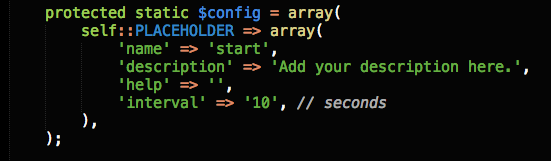
When you want to create a script it works like this: First you create your own script in app/console. Make sure this file has all the right permissions. The next step is to add this to the config in the Console.php file. You can add a description, name & an interval. The default is an interval of 60 seconds. Next step is to create your own Command file. This file has to implement two methods: Configure (where you will fetch the config from the Console class) and execute (where you will execute your own code – see using the ConsoleServiceProvider with Silex a few months ago). I’ve also added a Timing class which calculates how long a script runs.

Console Scripts Config

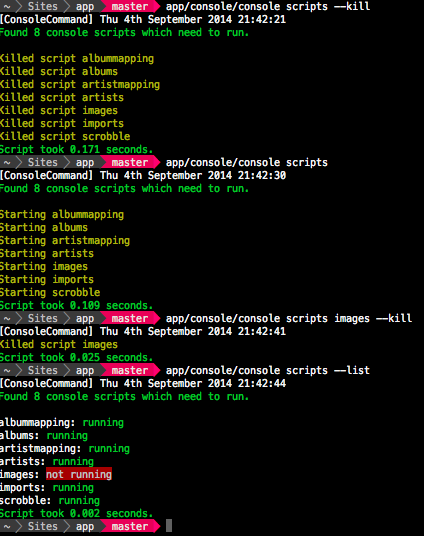
When this is all configured, running the “app/console/console scripts” command will try to execute all scripts that are available.
You can kill those scripts with the –kill optional argument. You can start (or kill) a single script like this:

app/console/console scripts import (--kill)

The output of all those scripts can be found in the app/logs/console files.

Example

Global Variables in Twig with Silex

Recently I assigned my user object to a template in my UserController. The moment I did this i realised I should assign this globally instead of reassigning it to each view. In my set-up, all my Controllers extend my CoreController class. It’s a place where I just put up some proxies that do a lot of general stuff so that my UserController (or other controllers) won’t be cluttered.

I’ve added my silex-base git repository to github, feel free to give me feedback on how my project structure looks. This repository can be installed using Composer and gives you the basic stuff you’ll need in an application. It used the Symfony Security component for registering and logging users in. Plus bonus points for twitter bootstrap.

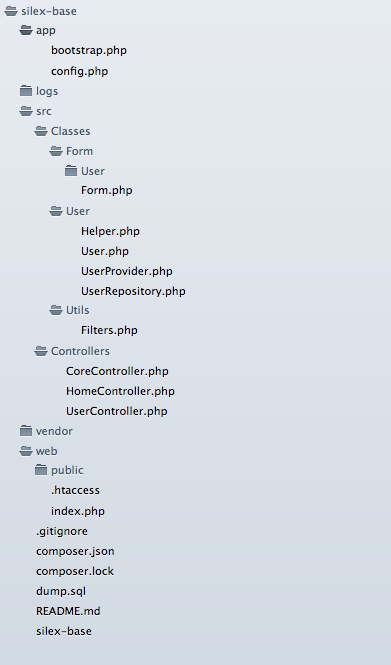
I’ve added the filters class from my previous post (Extending Twig template engine with Silex) and a mysql dump for users and logging.  The project structure looks like this and links to the Github repository:

Silex-base Structure

Now, back to the global variable issue|bug|feature:
Because of my CoreController which has methods like getTwig() and getUser() I could easily do something like this:

    /**
     * @return \Twig_Environment
     */
    protected function getTwig() {
        // add globals
        $this->app['twig']->addGlobal('user', $this->getUser());
        return $this->app['twig'];
    }

    /**
     * @return User|Null|string
     */
    protected function getUser() {
        if(is_null($this->getSecurity()->getToken())) {
            return null;
        }

        return $this->getSecurity()->getToken()->getUser();
    }

    /**
     * @return SecurityContext
     */
    protected function getSecurity() {
        return $this->app['security'];
    }

Great, I can now use my $user object in any template. Next up is getting phpunit working within Silex.
Any hints and tips on my project structure are greatly appreciated.