Extending Twig template engine with Silex

In my Silex project I’m currently using the Twig template engine. It’s a truly great template compiler. But it’s so much more than that. Just a copy paste from the Twig website:

  • Fast: Twig compiles templates down to plain optimized PHP code. The overhead compared to regular PHP code was reduced to the very minimum.
  • Secure: Twig has a sandbox mode to evaluate untrusted template code. This allows Twig to be used as a template language for applications where users may modify the template design.
  • Flexible: Twig is powered by a flexible lexer and parser. This allows the developer to define its own custom tags and filters, and create its own DSL.

For me, it took me some time to get used to this way of using PHP and templates, but the Twig project is greatly documented. Guaranteed solutions can be found on their documentation pages.

I wanted to extend Twig to use my custom classes and methods. I have a web application with registered users who have an email address. I want to show their gravatar as distinct users in my layout.
I don’t want to create HTML code from within my controllers, but I want something like this:

   <div class="users">
      {% for user in users %}
         <img title="{{ user.name }}" alt="{{ user.name }}" src="{{ user.email|gravatar }}" />
      {% endfor %}
   </div>

First of, we need to create a class where we will put our filters which extends \Twig_Extension. This class can be stored anywhere, just make sure your namespace can be used in your bootstrap file. This could look something like this:

Filter class which extends \Twig_Extension

We need to overwrite the abstract methods getFilters which will need to return all your filters you want to use. (As stated in the abstract class \Twig_Extension: Returns a list of filters to add to the existing list.). The getName() method must return an unique identifier for your extension.

Next we need to tell Twig that we have custom filters we want to use (after registering).

use Silex\Provider\TwigServiceProvider;

$app->register(new TwigServiceProvider(), array(
    'twig.path' => __DIR__ . '/../web/public/views'
));

$app['twig'] = $app->extend("twig", function (\Twig_Environment $twig, Silex\Application $app) {
    $twig->addExtension(new Classes\Utils\Filters($app));

    return $twig;
});
Using ConsoleServiceProvider with Silex

I recently needed a few scripts that run as cronjobs. Symfony has something like the Console Component which gives the possibility to create command line interfaces for your code.

The people from KNPLabs created a ConsoleServiceProvider which Provides a Symfony\Component\Console based console for Silex. Registering this service provider is easy as registering any other service provider. First step is adding the knplabs/console-service-provider to the composer.json file and running composer update.

{
   "require": {
      ...
      "knplabs/console-service-provider": "dev-master"
   },
   "autoload": {
      "psr-0": {"": "src/"}
   }
}

Next we’ll register the service and set some options:

use Knp\Provider\ConsoleServiceProvider;

/**
* Console Service Provider
*
*/
$app->register(new ConsoleServiceProvider(), array(
	'console.name' => 'ConsoleApp',
	'console.version' => '1.0.0',
	'console.project_directory' => __DIR__ . '/..'
));

Next up we’ll have to create a command script which extends the Knp\Command\Command. You’ll have to implement two methods to configure and execute a command. The configure method just defines what kind of commands are available and what kind of options you can use.

protected function configure() {
   $this
      ->setName('import')
      ->setDescription('Import all data.')
      ->addArgument(
         'userId',
         InputArgument::OPTIONAL,
         'Import for a specific user'
      )
      ->addOption(
         'debug',
         null,
         InputOption::VALUE_NONE,
         'If set, the task will run in debug mode'
      )
   ; // nice, new line
 }

If you need the Silex\Application $app you can retrieve it using the getSilexApplication() function (available in the Knp\Command\Command namespace).

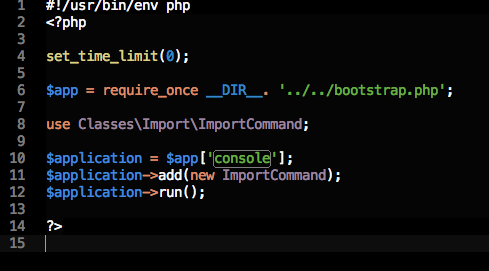
Next we need a console script which will use the Command created earlier. This will look something like this:
import console

Tip: If the executing fails, try php -d display_errors script.php to check syntax mistakes.

The execute commands looks like this:

protected function execute(InputInterface $input, OutputInterface $output) {
// use $input->getArgument('userId'); and $input->getOption('debug')
}

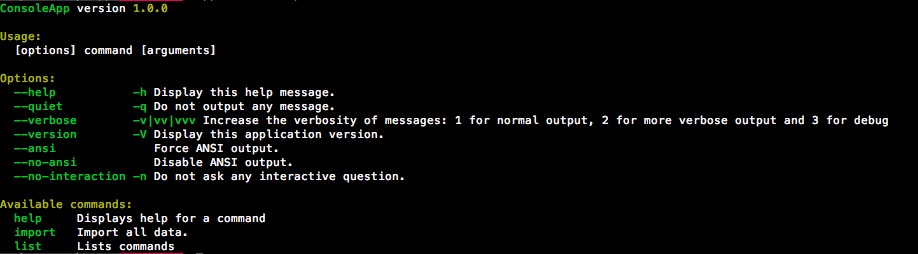
This is actually all you need to do. The configuration in your ImportCommand file will basically tell your console how to use it. Running [path to console file] without arguments will give you output about how to use your options and commands. (ex. app/console/imports).

Output when running the console file without arguments

Wow! Now you can while(true) or for(;;) the shit out of your application!

Cron jobs & cheap web hosting

I’m currently using one.com for my web hosting. I use it for personal testing and geeking around in nerdville. Lately the services of one.com where not enough anymore. I always could use and test what I wanted. It’s cheap and you have 24/7 support via chat.

I was building a website for a friend who owns a restaurant and he needed a guestbook page. Stubborn as I am, I didn’t want to create a guestbook when there are all these restaurant reviews websites around (with a lot of great content!). My first decision was to crawl some of these services and to show these reviews in our very own design. This worked seemingly fine but the page load was a huge turn-off. So; cronjobs!

The live chat support with one.com was something like this (and is mostly the same):

Me: Hey!
She: Hey, how can I help you?
Me: Do you support cron jobs?
She: No.
She: Is there anything else I can help you with?

With no SSH access this would be a serious hitch. Luckily there are a lot of paid (and free) services where you can set up your cron jobs. mywebcron is the one(pun) i’m using. Totally free and right to the point.

My Web Cron
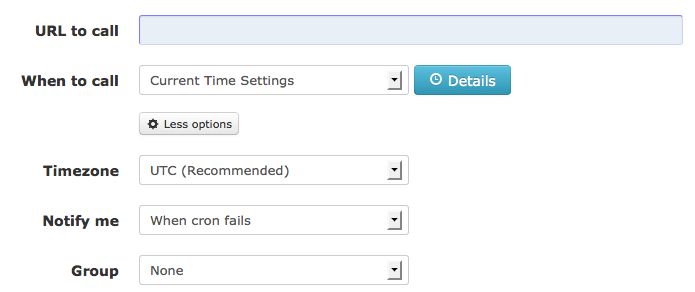
My Web Cron config

The script called does all the crawling and saves everything to my database. The pageload is now a complete turn-on. ah yezz.
It’s not the most clever solution, but it was all set up in about 10 minutes all-included. The cron runs every 15 minutes, just because I can. It’s also great to see when your website is offline.

There is another free service called Setcronjob which offers paid plans as well.  You get 50 points which means you can run 50 cronjobs daily. A big limition when you compare the previous one, but you’ll get email notifications. If you don’t run time expensive scripts (like mine) this would be a great service because of the cron timeout settings per plan.

Set Cron Job pricing

Set Cron Job email
Set Cron Job email

The guestbook is available at http://www.brasserieregina.be/